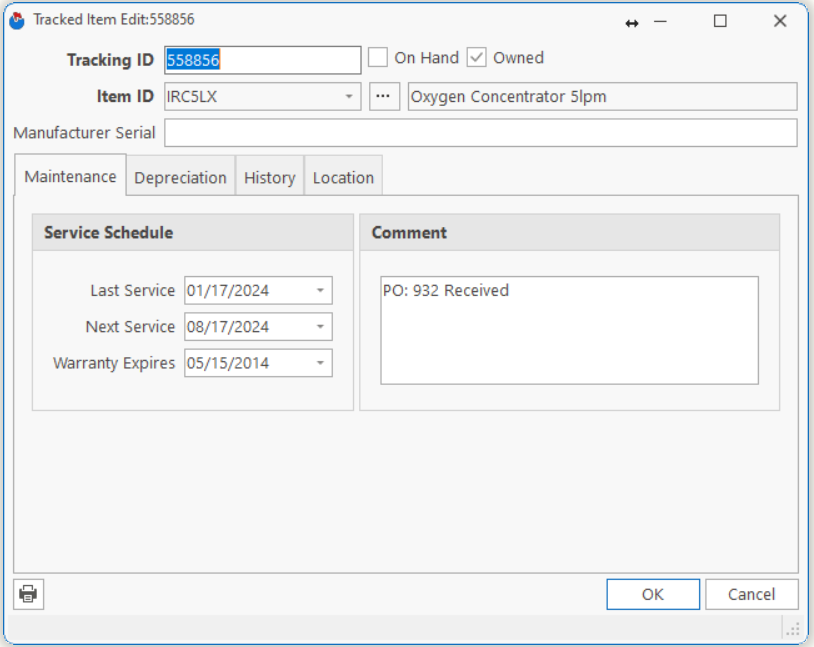
| Tracking ID | The number that you want to use to track this item. The Tracking Number may be your Asset Number, or the Manufacturer’s Serial Number if will not be assigning your own Asset Numbers. |
| Item ID | The Item ID of the tracked item.
Note: Once you choose and Item ID and save the Tracked Item, you cannot change it. This preserves a valid history for the Item. |
| Item Description | The description of the item. (Read only field). |
| Manufacturer Serial | The manufacturer’s serial number, if you are assigning your own Tracking Numbers. |
| On hand, Owned | Checked if the item is On hand (in your warehouse), and/or Owned (Owned by you although it may be with a customer)
Note: This is a read-only field. You can change this using a Physical Count or Item Transaction. |
| Last/Next Service | The date you last serviced the item, and the date you next expect to service the item.
Note: Normally you will not need to edit these fields as they are automatically updated as you enter Service Transactions. |
| Warranty Expires | The warranty expiration date.
Note: This can be used to print a report of Items which will soon be reaching the end of warranty. You can schedule a service visit prior to ensure the Item is performing to standards. |
| Comment | Comments relating to this item. |
Tell us what you think.
You must be logged in to post a comment.