• Tutorials
    • Forms, Navigation
    • Forms, Popup and Context Menus
    • Forms, Color of Fields
    • Forms, Changing the Font
    • Forms, Customizing
    • Forms, Printing Reports
    • Forms, Send Email
    • Forms, Help
    • Grids, Navigation
    • Grids, Scrollbars
    • Grids, Functions
    • Grids, Functions, Refresh
    • Grids, Functions, New Wizard
    • Grids, Incremental Search
    • Grids, Selecting Multiple Records
    • Grids, Find and Find Next
    • Grids, Filters
      • Filters, Creating a New
      • Filters, Getting Fancy
      • Filters, Saving and Reusing
      • Filters, Default Filters
    • Grids, Printing Reports
    • Grids, Customizing
    • Menus, Shortcut Keys
    • Forms, Form Letters
      • How to print a Form Letter, Richtext
      • How to print a Form Letter, PDF
      • How to create your own Form Letter
  • Webinars
  • Training
    • Windows XL Training
    • Mobile Delivery
  • What’s New
  • Follow us on Twitter

TeamDME! XL Help

  • System
    • Company
    • Postal Codes
    • Task
    • User Security
    • Dashboard
    • Report Designer
  • Inventory
    • Item
    • Item Category
    • Item Department
    • Item Manufacturer
    • Item Location
    • Tracked Item
    • Activity
      • Physical Count
      • Item Adjustment Edit
      • Service Transaction Edit
      • Item Transfer Edit
    • Reports
  • Orders
    • Diagnosis Code
    • HCPCS Procedure Code, Edit
    • HCPCS Procedure Modifier
    • HCPCS Coverage Criteria List
    • HCPCS Fee Schedule
    • Physician
    • Payor
    • Therapist
    • Facility
    • Quote
    • Medical Order
    • Point-of-Sale
    • Recurring
    • Claim Pending
    • Claim History
    • Reports
  • Receivable
    • Customer
    • Salesperson
    • Referral
    • Nonallowed Reason
    • Responsible Reason
    • Adjustment Reason
    • Payment Type
    • Payment
    • Reports
      • Aged Receivable Reports
      • Revenue Reports
      • Audit Reports
      • Finance Fee
      • Customer Statement
      • Collection Letter
  • Purchase Orders
    • Purchase Order
    • Purchase History
  • Payables
    • Vendor
    • Unposted Invoice
    • Unpaid Invoice
    • Reports
      • Aged Payable
      • Open Payable
      • Cash Requirements
      • IRS 1099 Forms
  • Ledger
    • Chart of Account
    • Journal Unposted
    • Journal History
    • Bank Register
    • Reports
      • Balance Sheet
      • Income Statement
      • Trial Balance
  • Windows
You are here: Home / Orders / Claim / Claim Pending
«« ClaimClaim Pending List, Print Paper Claims »»

Claim Pending

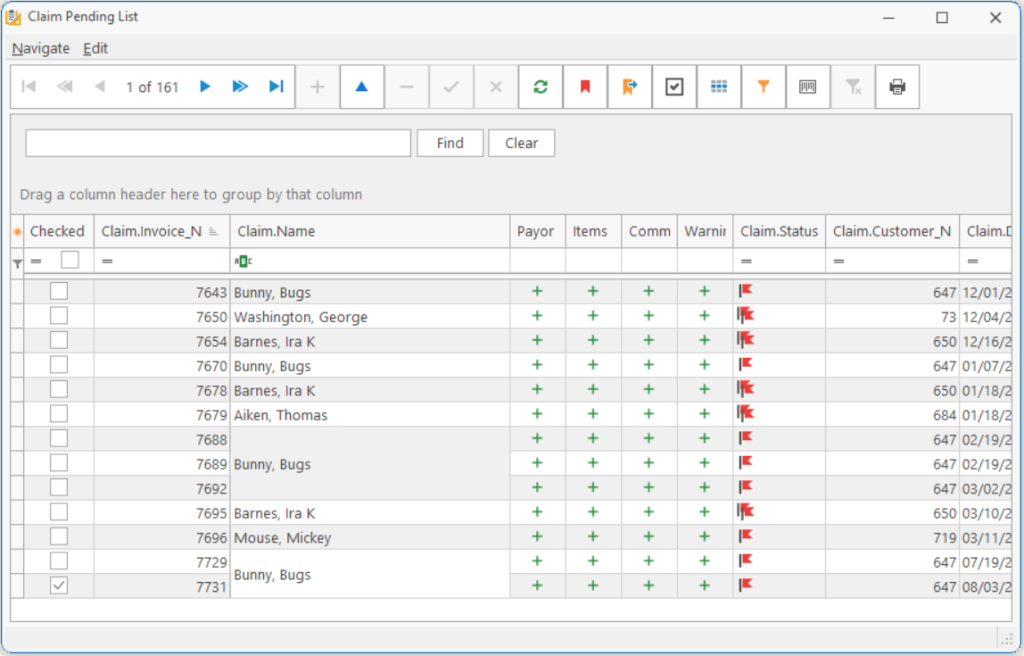
The Claims Pending List looks and acts as Medical Orders module with a few distinctions. Claims are basically orders which have been posted. There are fields that cannot be modified once the order is turned into a claim.

Join Invoices Allows you to join two Claims together into one. See How_to_Join_two_Orders_Together.
Print Reports Allows you to select a report to print.
Claim Status Inquiry
Create Request File Creates a Claims Status Inquiry (CSI) for Claims last billed during a selected period.
Import Result File Imports the result of a CSI file. This creates comments attached to the Claim Lines.
Calculate Claim Status Calculates the Ready-to-Post status of Claims.
Incomplete Items Prints orders that have incomplete or missing information.

imgflagwarning.gif Warning; Will not stop submitting.
imgflagerrorminor.gif Error, Minor; Will stop submitting.
imgflagerrorcritical.gif Error, Critical; Will stop submitting.

Ready To Print Items Prints Claim Items that have been calculated and deemed ready to print to the Payors/Customers.
Paper Claims Prints Paper Claims which are ready to print.
Electronic Claims Creates an Electronic File of Claims which are ready to submit.
Customer Invoices Prints Customer Invoices which are ready to print.
Work-In-Process See Quote_List

TIP: When you first open the Claim Pending List, the system will notify you if there are any Claim Status Inquiry Result files available.

Page Tags: Claim, Pending
«« ClaimClaim Pending List, Print Paper Claims »»

Tell us what you think. Cancel reply

You must be logged in to post a comment.

RETURN TO TOP

Copyright 2014-2026 · TeamDME!, Inc. · All Rights Reserved · Log in