• Tutorials
    • Forms, Navigation
    • Forms, Popup and Context Menus
    • Forms, Color of Fields
    • Forms, Changing the Font
    • Forms, Customizing
    • Forms, Printing Reports
    • Forms, Send Email
    • Forms, Help
    • Grids, Navigation
    • Grids, Scrollbars
    • Grids, Functions
    • Grids, Functions, Refresh
    • Grids, Functions, New Wizard
    • Grids, Incremental Search
    • Grids, Selecting Multiple Records
    • Grids, Find and Find Next
    • Grids, Filters
      • Filters, Creating a New
      • Filters, Getting Fancy
      • Filters, Saving and Reusing
      • Filters, Default Filters
    • Grids, Printing Reports
    • Grids, Customizing
    • Menus, Shortcut Keys
    • Forms, Form Letters
      • How to print a Form Letter, Richtext
      • How to print a Form Letter, PDF
      • How to create your own Form Letter
  • Webinars
  • Training
    • Windows XL Training
    • Mobile Delivery
  • What’s New
  • Follow us on Twitter

TeamDME! XL Help

  • System
    • Company
    • Postal Codes
    • Task
    • User Security
    • Dashboard
    • Report Designer
  • Inventory
    • Item
    • Item Category
    • Item Department
    • Item Manufacturer
    • Item Location
    • Tracked Item
    • Activity
      • Physical Count
      • Item Adjustment Edit
      • Service Transaction Edit
      • Item Transfer Edit
    • Reports
  • Orders
    • Diagnosis Code
    • HCPCS Procedure Code, Edit
    • HCPCS Procedure Modifier
    • HCPCS Coverage Criteria List
    • HCPCS Fee Schedule
    • Physician
    • Payor
    • Therapist
    • Facility
    • Quote
    • Medical Order
    • Point-of-Sale
    • Recurring
    • Claim Pending
    • Claim History
    • Reports
  • Receivable
    • Customer
    • Salesperson
    • Referral
    • Nonallowed Reason
    • Responsible Reason
    • Adjustment Reason
    • Payment Type
    • Payment
    • Reports
      • Aged Receivable Reports
      • Revenue Reports
      • Audit Reports
      • Finance Fee
      • Customer Statement
      • Collection Letter
  • Purchase Orders
    • Purchase Order
    • Purchase History
  • Payables
    • Vendor
    • Unposted Invoice
    • Unpaid Invoice
    • Reports
      • Aged Payable
      • Open Payable
      • Cash Requirements
      • IRS 1099 Forms
  • Ledger
    • Chart of Account
    • Journal Unposted
    • Journal History
    • Bank Register
    • Reports
      • Balance Sheet
      • Income Statement
      • Trial Balance
  • Windows
You are here: Home / Orders / Order / Medical Order / Medical Order Item Edit, Document
«« Medical Order Item Edit, RecurringMedical Order Item Edit, Comment »»

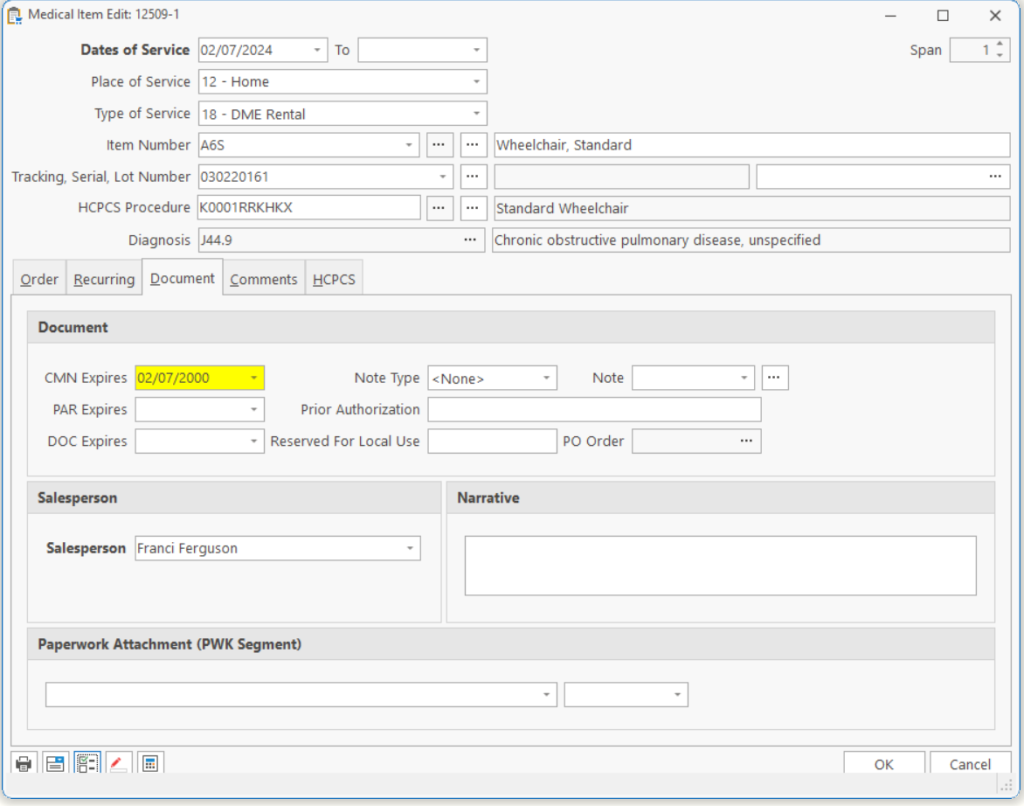
Medical Order Item Edit, Document

CMN Expires The date the CMN will expire and billing should be halted. This allows you to stop a claim from being printed until you receive the proper documentation from the patient’s physician.

Note: An expired CMN will not stop an order from posting but will stop a claim from being printed. If this is the initial CMN, you should enter the starting date of service to recognize that a CMN is required but has not been received.

Note Type Choice of 4 different note types:

1. CMN form.
2. Doctor’s Order.
3. Narrative.
4. Repeating Narrative (narrative is sent with each claim resulting from this order).

Note Note number from the Customer Edit, Comments tab.

Note: When you indicate an item requires a CMN or a Narrative, the documentation window appears in the drop down. You will need to select a document or print a document for this item. Once you have selected a document, it’s document number appears for the number.

Note: If a CMN is attached, then clicking on the ellipse button will open the CMN document and allow the user to enter information from the CMN.

PAR Expires The date the Prior-Authorization (PAR) expires and billing should be halted. This allows you to stop an order from being shipped until you receive the proper authority’s approval to supply the item.

Note: An expired PAR will not stop an order from being entered but will stop a delivery ticket (Batch) from being printed and will not allow the item to be posted to claims.

Note: If this is the initial order, you should enter the starting date of service to recognize that a PAR is required but has not been received.

Prior Authorization Enter the prior authorization number for this line item if items have different prior authorization numbers.
DOC Expires User-Defined Documentation. The date you would like the billing halted. This allows you to stop a claim from being printed until you receive any documentation you may require to continue service.

Note: An expired DOC will not stop an order from posting but will stop a claim from being printed.

Note: If this is the initial DOC, you should enter the starting date of service to recognize that a DOC is required but has not been received.

Reserved for Local Use Miscellaneous field, used to print 24K on the CMS-1500 form for certain payors.
PO Order If you created a Purchase Order from this Medical Order, then the Purchase Order will appear here.
Salesperson The Salesperson who gets credit for this Line Item.
Narrative Text to be submitted electronically as the Narrative.

Note: This field overrides the Narrative in any CMN/Narrative attached to this Line Item.

Note: Narrative is limited to 80 characters by the ANSI 5010 format.

Paperwork Attachment Choose the type of paperwork you want to attach to this line item. Choose how you will send the paperwork, fax or mail.
Page Tags: Document, Medical
«« Medical Order Item Edit, RecurringMedical Order Item Edit, Comment »»

Tell us what you think. Cancel reply

You must be logged in to post a comment.

RETURN TO TOP

Copyright 2014-2026 · TeamDME!, Inc. · All Rights Reserved · Log in