• Tutorials
    • Forms, Navigation
    • Forms, Popup and Context Menus
    • Forms, Color of Fields
    • Forms, Changing the Font
    • Forms, Customizing
    • Forms, Printing Reports
    • Forms, Send Email
    • Forms, Help
    • Grids, Navigation
    • Grids, Scrollbars
    • Grids, Functions
    • Grids, Functions, Refresh
    • Grids, Functions, New Wizard
    • Grids, Incremental Search
    • Grids, Selecting Multiple Records
    • Grids, Find and Find Next
    • Grids, Filters
      • Filters, Creating a New
      • Filters, Getting Fancy
      • Filters, Saving and Reusing
      • Filters, Default Filters
    • Grids, Printing Reports
    • Grids, Customizing
    • Menus, Shortcut Keys
    • Forms, Form Letters
      • How to print a Form Letter, Richtext
      • How to print a Form Letter, PDF
      • How to create your own Form Letter
  • Webinars
  • Training
    • Windows XL Training
    • Mobile Delivery
  • What’s New
  • Follow us on Twitter

TeamDME! XL Help

  • System
    • Company
    • Postal Codes
    • Task
    • User Security
    • Dashboard
    • Report Designer
  • Inventory
    • Item
    • Item Category
    • Item Department
    • Item Manufacturer
    • Item Location
    • Tracked Item
    • Activity
      • Physical Count
      • Item Adjustment Edit
      • Service Transaction Edit
      • Item Transfer Edit
    • Reports
  • Orders
    • Diagnosis Code
    • HCPCS Procedure Code, Edit
    • HCPCS Procedure Modifier
    • HCPCS Coverage Criteria List
    • HCPCS Fee Schedule
    • Physician
    • Payor
    • Therapist
    • Facility
    • Quote
    • Medical Order
    • Point-of-Sale
    • Recurring
    • Claim Pending
    • Claim History
    • Reports
  • Receivable
    • Customer
    • Salesperson
    • Referral
    • Nonallowed Reason
    • Responsible Reason
    • Adjustment Reason
    • Payment Type
    • Payment
    • Reports
      • Aged Receivable Reports
      • Revenue Reports
      • Audit Reports
      • Finance Fee
      • Customer Statement
      • Collection Letter
  • Purchase Orders
    • Purchase Order
    • Purchase History
  • Payables
    • Vendor
    • Unposted Invoice
    • Unpaid Invoice
    • Reports
      • Aged Payable
      • Open Payable
      • Cash Requirements
      • IRS 1099 Forms
  • Ledger
    • Chart of Account
    • Journal Unposted
    • Journal History
    • Bank Register
    • Reports
      • Balance Sheet
      • Income Statement
      • Trial Balance
  • Windows
You are here: Home / Orders / Order / Medical Order / Medical Order Item Edit, Order
«« Medical Order Item Edit, Lot NumberMedical Order Item Edit, Recurring »»

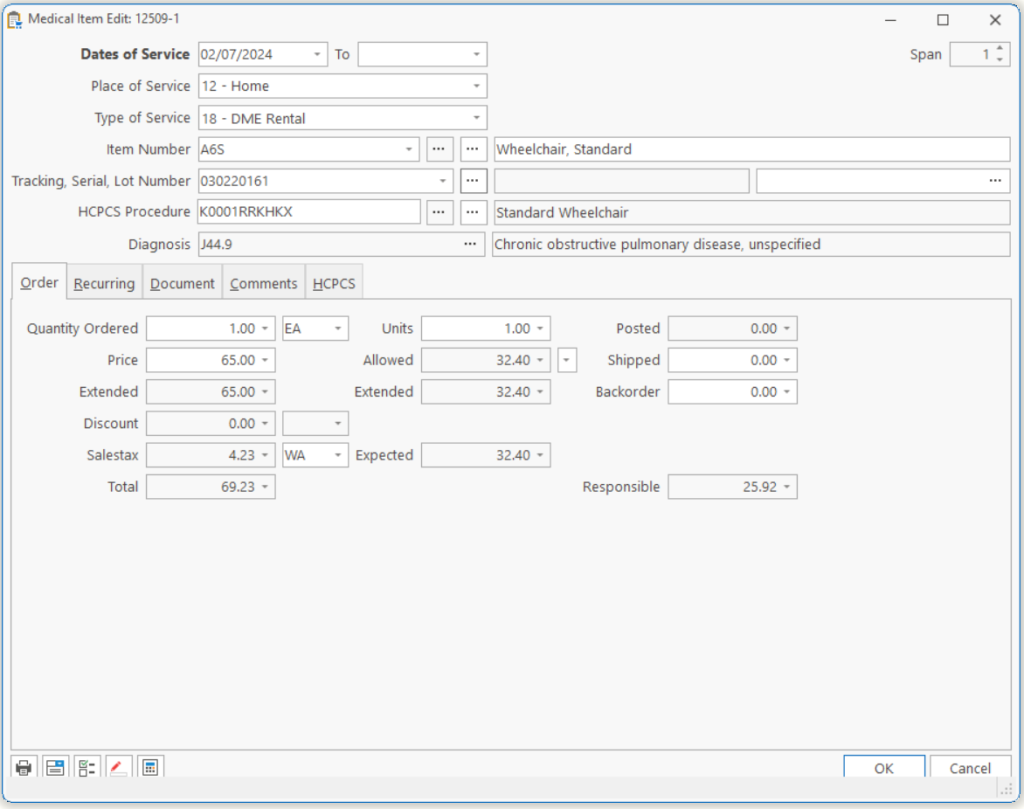
Medical Order Item Edit, Order

Quantity Ordered The quantity you are ordering for the patient.
Package This is how the item is packaged. Example: Each, Box, Case, etc.
Price The price per each item ordered.
Extended This is the Quantity times the Price.
Discount, ID

The Discount to be applied to this Line Item and the Discount ID.

Note: Available as part of the Point-of-Sale module.

Salestax, ID

This is the Salestax amount and the Taxtable ID.

Total

This is the Total amount for this item. This is a read only field.

Units

The days or units you want to appear on the claim form.

Note: This is calculated automatically but may be changed by the user.

Allowed Allowed amount. This is a read only field. The Allowed amount is based on the Tie associated with the order; Fee Schedule, HCPCS Tie, U&C or Special Allowable.
Extended This is the Units times the Allowed Amount.
Expected

This is the lower if the Total and the Extended Allowable.

Posted

This is the dollar amount posted for this item. This is a read only field.

Shipped

The shipped quantity.

Backorder

The quantity that has been ordered but has not been shipped due to an inventory shortage.

Note: This is calculated automatically but may be changed by the user.

Responsible

This is the Expected amount times the 1st percentage that is on the customer’s Policy tab for the primary payor for this Medical Order.

Page Tags: Medical, Order
«« Medical Order Item Edit, Lot NumberMedical Order Item Edit, Recurring »»

Tell us what you think. Cancel reply

You must be logged in to post a comment.

RETURN TO TOP

Copyright 2014-2026 · TeamDME!, Inc. · All Rights Reserved · Log in