• Tutorials
    • Forms, Navigation
    • Forms, Popup and Context Menus
    • Forms, Color of Fields
    • Forms, Changing the Font
    • Forms, Customizing
    • Forms, Printing Reports
    • Forms, Send Email
    • Forms, Help
    • Grids, Navigation
    • Grids, Scrollbars
    • Grids, Functions
    • Grids, Functions, Refresh
    • Grids, Functions, New Wizard
    • Grids, Incremental Search
    • Grids, Selecting Multiple Records
    • Grids, Find and Find Next
    • Grids, Filters
      • Filters, Creating a New
      • Filters, Getting Fancy
      • Filters, Saving and Reusing
      • Filters, Default Filters
    • Grids, Printing Reports
    • Grids, Customizing
    • Menus, Shortcut Keys
    • Forms, Form Letters
      • How to print a Form Letter, Richtext
      • How to print a Form Letter, PDF
      • How to create your own Form Letter
  • Webinars
  • Training
    • Windows XL Training
    • Mobile Delivery
  • What’s New
  • Follow us on Twitter

TeamDME! XL Help

  • System
    • Company
    • Postal Codes
    • Task
    • User Security
    • Dashboard
    • Report Designer
  • Inventory
    • Item
    • Item Category
    • Item Department
    • Item Manufacturer
    • Item Location
    • Tracked Item
    • Activity
      • Physical Count
      • Item Adjustment Edit
      • Service Transaction Edit
      • Item Transfer Edit
    • Reports
  • Orders
    • Diagnosis Code
    • HCPCS Procedure Code, Edit
    • HCPCS Procedure Modifier
    • HCPCS Coverage Criteria List
    • HCPCS Fee Schedule
    • Physician
    • Payor
    • Therapist
    • Facility
    • Quote
    • Medical Order
    • Point-of-Sale
    • Recurring
    • Claim Pending
    • Claim History
    • Reports
  • Receivable
    • Customer
    • Salesperson
    • Referral
    • Nonallowed Reason
    • Responsible Reason
    • Adjustment Reason
    • Payment Type
    • Payment
    • Reports
      • Aged Receivable Reports
      • Revenue Reports
      • Audit Reports
      • Finance Fee
      • Customer Statement
      • Collection Letter
  • Purchase Orders
    • Purchase Order
    • Purchase History
  • Payables
    • Vendor
    • Unposted Invoice
    • Unpaid Invoice
    • Reports
      • Aged Payable
      • Open Payable
      • Cash Requirements
      • IRS 1099 Forms
  • Ledger
    • Chart of Account
    • Journal Unposted
    • Journal History
    • Bank Register
    • Reports
      • Balance Sheet
      • Income Statement
      • Trial Balance
  • Windows
You are here: Home / Orders / Recurring / How to Pickup a Recurring Order/Line Item.
«« How to Delete a Recurring Order/Line Item.How to Pickup a Purchased Item. »»

How to Pickup a Recurring Order/Line Item.

Sometimes it is necessary to pickup an item from a patient and return it to inventory. Examples would be if the Item is no longer medically needed, or if the patient has expired.

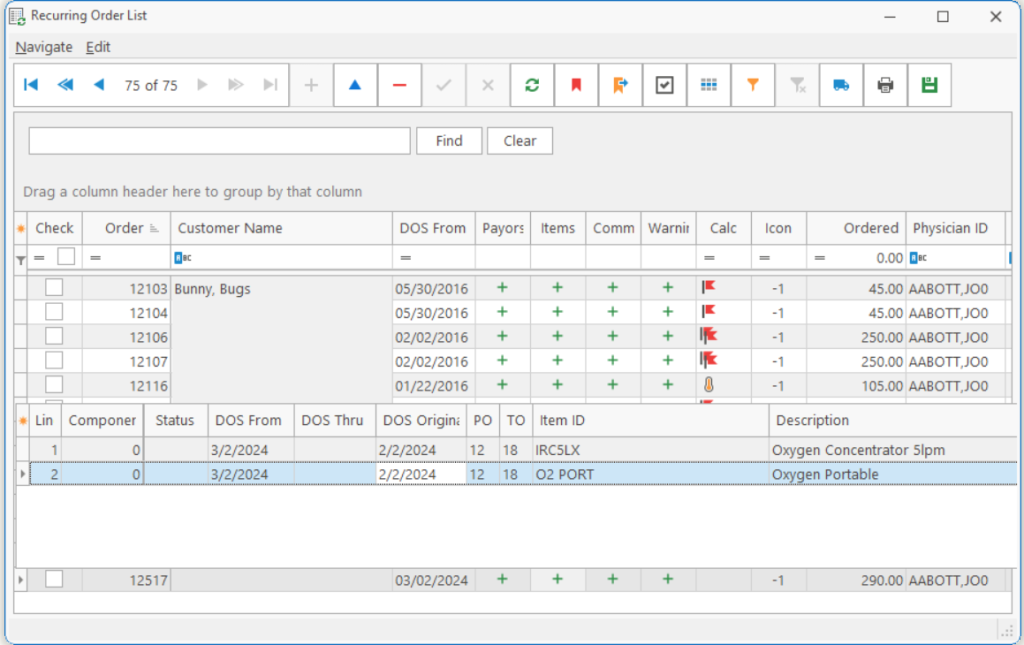
Step 1 Find the recurring order in the Recurring Order List and click on the Expand button denoted by a plus symbol in the Items column to drop down the detail items.
Step 2 Select one or more items to pickup, by pressing Ctrl and clicking on the desired item(s).
Step 3 Create a Pickup Ticket by clicking on the Pickup button denoted by the Pickup Truck symbol  on the tool bar.
Step 4 Enter the date the customer requested that you pickup the item in Posting Date to Use. This will create a pickup ticket in orders with the requested Pickup Date. The system will now hold all Recurring Orders including this item(s) after this date.
Step 5 You are finished, but the next screen will review steps you’ll need to complete the pickup.
  1. Print the pickup ticket.
  2. Deliver/Mark the item in Orders
  3. Post the new pickup order.
  4. Once the item has been picked up and posted, it will be returned to inventory.

Tip: If you don’t select at least one item in the Recurring Order, the entire order will be picked up.

Page Tags: How, Pickup, Recur
«« How to Delete a Recurring Order/Line Item.How to Pickup a Purchased Item. »»

Tell us what you think. Cancel reply

You must be logged in to post a comment.

RETURN TO TOP

Copyright 2014-2026 · TeamDME!, Inc. · All Rights Reserved · Log in