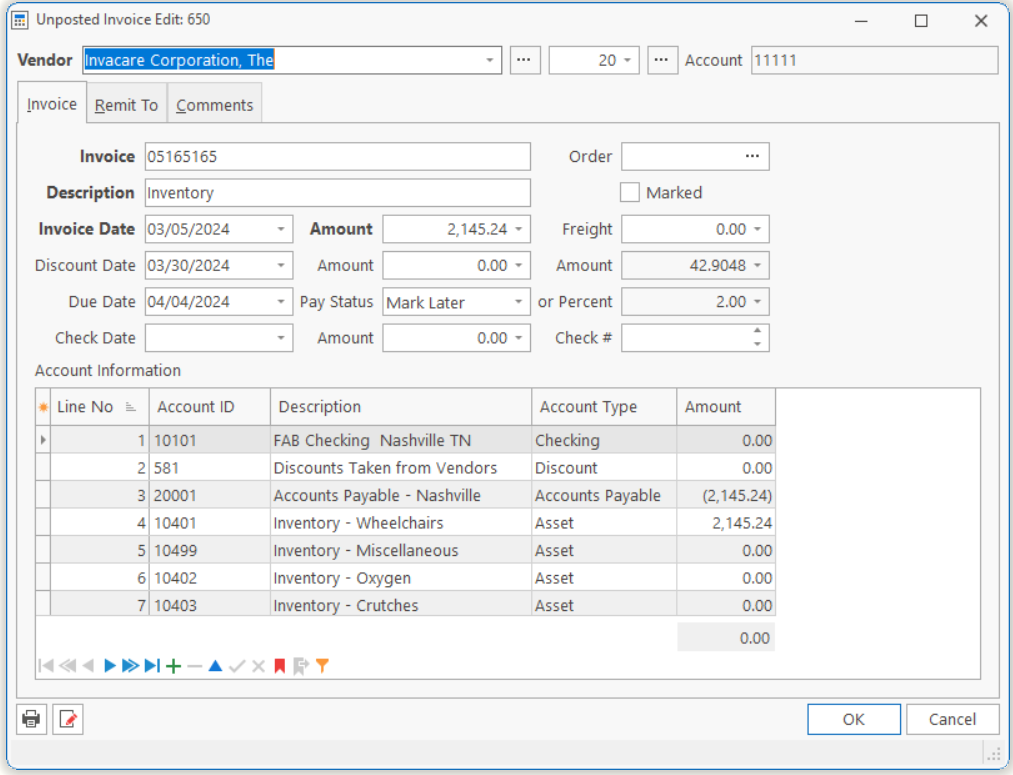
| Vendor Name and Number | The name and number of the Vendor. | ||||||
| Account Number | Displays your account number with the vendor. | ||||||
| Invoice | The invoice number issued by the vendor.
Note: If the vendor sends you an invoice or statement with no invoice number, you will use the invoice or statement date. However, in order to display all the invoice from this vendor in chronological order, you should enter the date in YYYYMMDD (year, month and day) order. |
||||||
| Order Number | The Purchase Order Number you issued to order the goods or services.
Note: If you enter a purchase order number issued by the TeamDME! Purchase Order module, the system will automatically enter the invoice amount and Ledger distribution based on the purchase order. If the purchase order amount is grossly different from the amount billed on the invoice, you would need to investigate the reason. See How To Reconcile Payable Invoices To Purchase Orders |
||||||
| Description | Description of what the Invoice represents. | ||||||
| Invoice Date | Date the invoice was issued. | ||||||
| Amount | Total amount of the invoice. | ||||||
| Freight | Freight amount for this invoice. | ||||||
| Discount Date | Date at which you could make full payment and receive a discount. | ||||||
| Amount | Discount amount that you will force the system to take.
Note: The system will calculate this amount when printing a check, so you do not need to enter it. But if you want to take an amount different from that calculated, you should enter it. |
||||||
| Amount | Calculated discount amount based on the discount percentage and date.
Note: Discount amount is calculated based on the Invoice minus Freight times Discount Percentage. |
||||||
| Due Date | The date the invoice is due to be paid. | ||||||
| Pay Status |
|
||||||
| Percent | Percentage discount you would receive if full payment is made prior to the discount date.
Note: You can enter a discount amount or a percentage, but not both. |
||||||
| Check Date | Date the manual check was written.
Note: If the invoice has not been paid with a manual check, leave the check date, check amount and number blank. |
||||||
| Amount | Amount of the check issued, or to be printed. | ||||||
| Check Number | Number of the check issued. | ||||||
| Account Information | |||||||
| Account | Account Number in the Chart-of-Accounts to create journal for this amount. | ||||||
| Description | Displays the description of the Account Number. | ||||||
| Account Type | Displays the type of the Account Number. | ||||||
| Amount | Amount of journal which should be sent to this Account. This can be a positive (debit) or negative (credit) amount.
Note: The subtotal at the bottom of the grid sums the amounts. Your debits must match credits in order to post, so when you have entered all your distributions, the difference should be zero. |
||||||
|
Tell us what you think.
You must be logged in to post a comment.