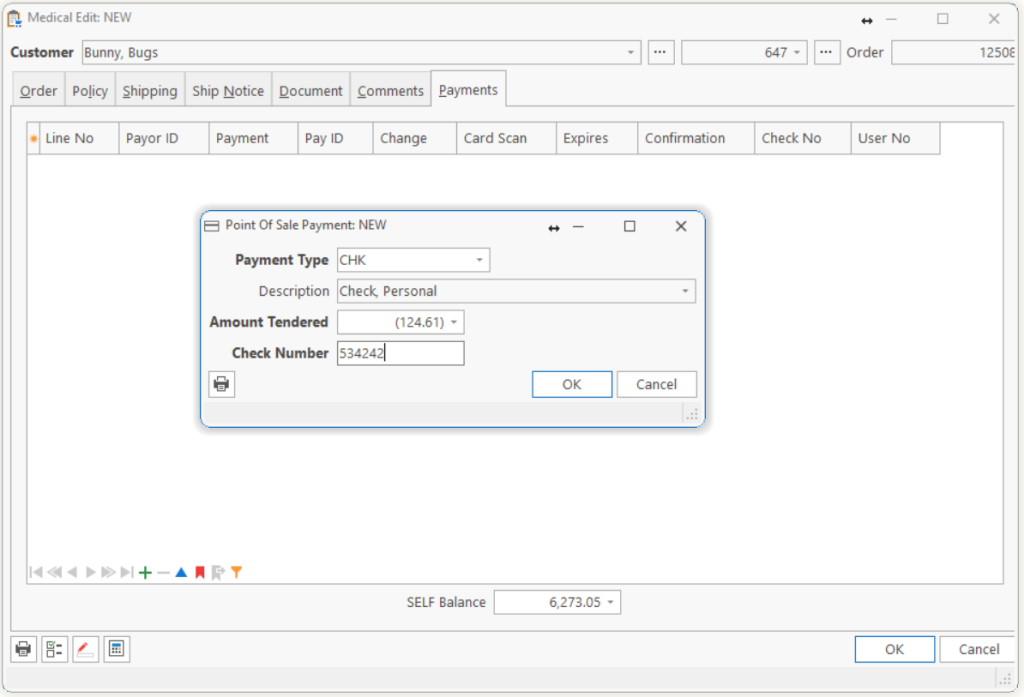
Sometimes customers will want to pay for items at the time it is received or ordered. This will be normal if the items are Self pay, or the patient may want to pay their 20% copay. This payment may be entered while you are entering the order or marking the items delivered, if you have the Point-of-Sale module.
| Step 1 | Add a payment, by selecting the Payments tab from the Medical Edit form and adding a new payment record by clicking the Add button or pressing Ctrl-N. |
| Step 2 | Select the Payment Type for the payment you received (Example CHK for Check). |
| Step 3 | Enter the Amount Tendered. If the payment received was more than the amount of the order, the change to return to the customer will display in the Change To Give field. |
| Step 4 | Some payment types ask other questions. For example, VIS (Visa) asks for the card number, expiration date and card holder’s name when credit card verification is installed. |
Tip: If you don’t see the Payments tab, you may not have the Point-of-Sale module installed.
Tell us what you think.
You must be logged in to post a comment.