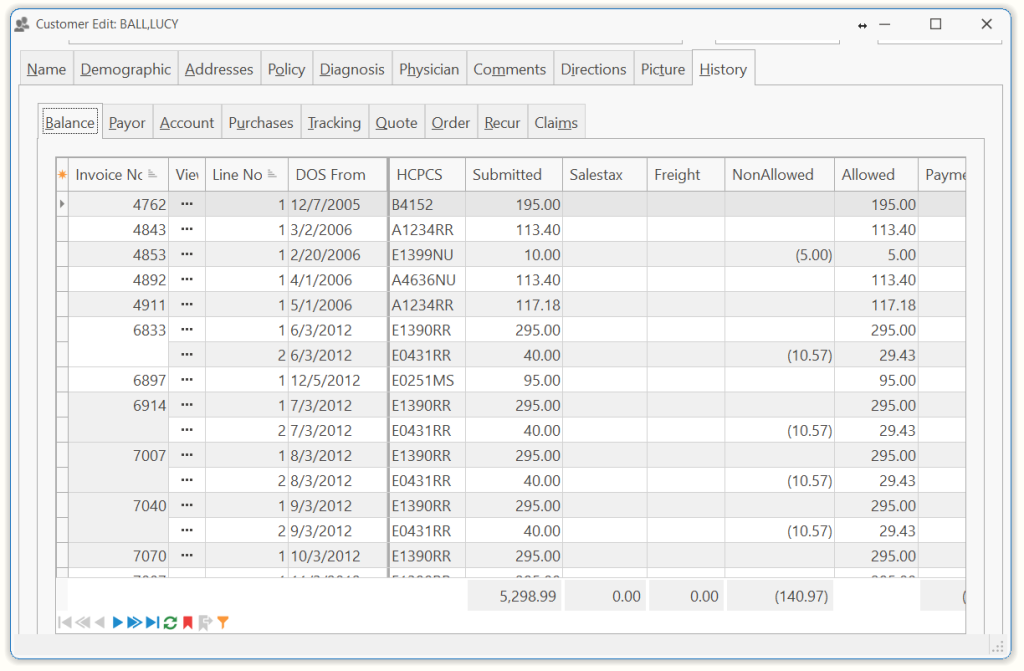
This displays the patient’s account history including the invoice and order numbers, service dates, invoice amounts, adjustments, payments and open amounts per invoice. The information located here will automatically change based on transactions.
| Balance | This grid shows the remaining balance as well as payments, adjustments, and etc. on outstanding invoices. |
| Payor | This grid groups the remaining invoices by payor. Here you can easily see who owes you and how much. |
| Account | This grid shows all transactions for this customer’s account. Each transaction is a new line. |
| Purchases | This grid gives detailed information about the customer’s purchases and rentals. |
| Tracking | This grid shows the tracked items for this customer and detailed information for the tracked item. |
| Quote | This grid shows all quotes for the customer. |
| Order | This grid shows all medical orders for the customer. |
| Recur | This grid shows all recuring orders for the customer. |
| Claims | This grid shows all claims for the customer. |
Tip: When you click on the Invoice number, the grid will display an ellipse button which you can click to display the Claim Edit form.
Tell us what you think.
You must be logged in to post a comment.