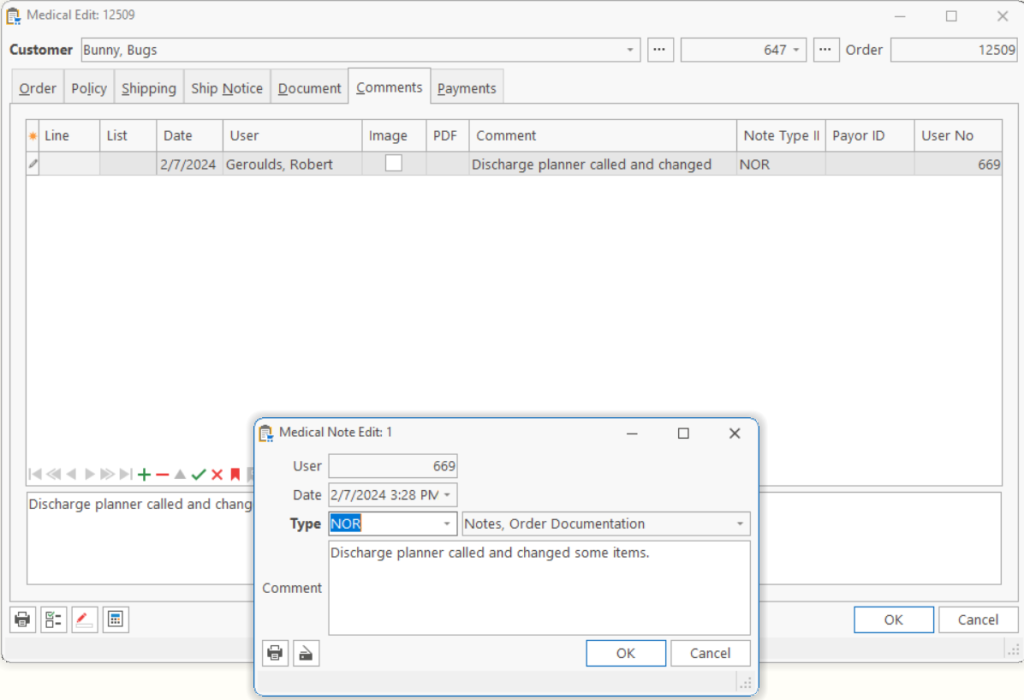
Comments are used to document any notes the user would like to associate with an Order, as well as events which happened to/for an Order or Line Item. Comments which are entered on the Order will be associated with the Order only. Comments entered on the Order Item Edit will be associated with a particular line item of the order.
| Type | The type of comment to add. The comment types are predefined and identify what kind of comment it is and what you want the comment to do. |
| Comment | The text of the comment. |
Type
| DTC | Delivery Ticket, Comments; Comments which should be printed on the Delivery Ticket. Example: Unsure of what mask size patient will need, please take several. |
| DTR | Delivery Ticket, Received POD; Records the Proof of Delivery. This is normally used to scan the signed Delivery Ticket as it returns to the office. |
| NCL | Claim Attachment; Scan a document which needs to be attached to the claim when submitted to the payor. Example: Catalog page for product ordered, or Payable invoice for product. (Required by select payors) |
| NCO | Collection Documentation; Comments which are associated with the collection process. Example: Claim denied for insufficient documentation, corrected and resubmitted. |
| NOR | Order Documentation; General comments about an order. |
Tip: Viewing comments on the Order Item Edit, Comment Card will show only the comments associated with an Item. Viewing comments on the Order, Comment Card will show all comments for the Order and all comments for each of the Order Items. So this gives you a view of all the comments for the Order.
Note: There are several other types of comments generated by the system during certain events; such as when an ABN is printed, an Authorization is printed, etc.
Tell us what you think.
You must be logged in to post a comment.