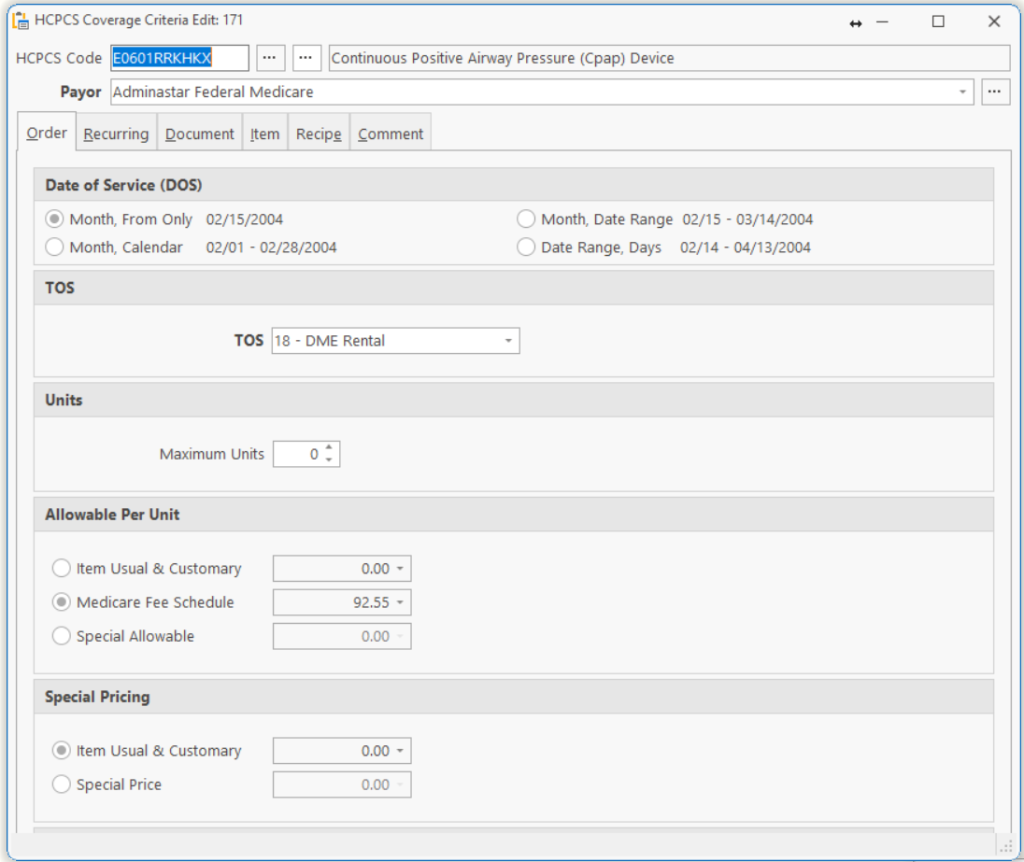
| HCPCS Code | Enter the HCPCS Code AND modifiers you want to BILL. If this is a capped rental for Medicare, put the KH modifier at the end. |
| Payor | Enter the payor for this Coverage Criteria. |
Note: If you want this coverage criteria to be used for ALL payors, enter the payor called ALL PAYORS.
Dates of Service
| Month, From Only | Most Common |
| Month, Calendar | Hospice, Enteral for Facilities |
| Month, Date Range | Rentals and supply items to be billed on anniversary date. |
| Date Range, Days | Diabetic Supplies, CPM’s |
TOS
Enter the Type of Service for this coverage criteria.
12 = purchase,
18 = Rental
Maximum Units
Enter the Units of HCPCS per item. e.g.: If you are billing Medicare for ostomy pouches, then enter the number of pouches per box in this field.
Allowable per HCPCS
The amount of submitted charge allowed by this payor for this HCPCS procedure code.
Item Usual & Customary – Use this for any Tie you do NOT have a specific allowable.
Medicare Fee Schedule – Use this for any Tie if you want to use Medicare allowable.
Special Allowable – Use this for any Tie that you want to enter a specific allowable for this payor.
Special Pricing
Item Usual & Customary – Use this if you want to BILL the Payor the Usual & Customary price that was entered in the package card in the item.
Special Price – If you have negotiated a contract with the payor, enter the special price here.
Tell us what you think.
You must be logged in to post a comment.