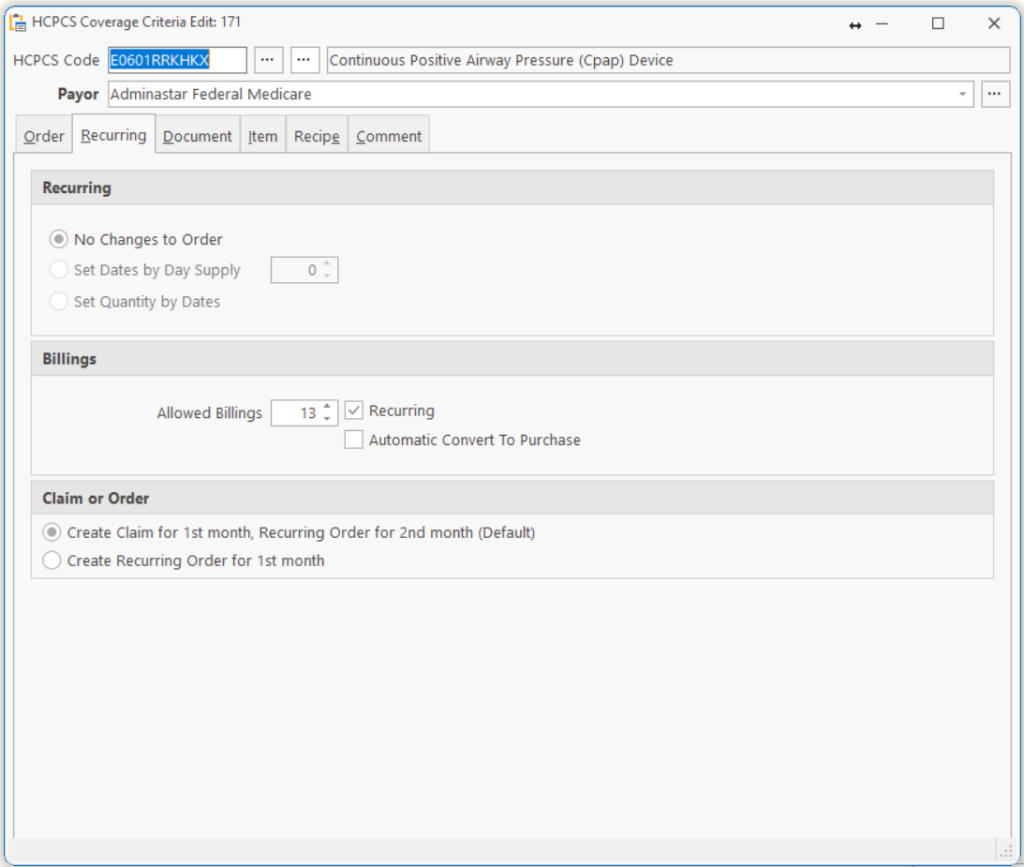
| Recurring | |
| No Changes to Order | No changes for recurring. |
| Set Dates by Days Supply | To be used with Date Range, Days. Set dates by days supply. |
| Set Quantity by Dates | This calculates the number of units by the date span. |
| Billings | |
| Allowed Billings | Enter the number of times you want this order to Recur. |
| Recurring | Checked if this tie is recurring. |
| Automatic Convert to Purchase | Check this box if the Payor has purchased the Item after the number of Allowed Billings.
Example: Medicare will pay for a standard wheelchair rental for 13 months. The system will automatically bill Medicare 12 months rental (TOS=18), then convert the Order to a Purchase (TOS=12) on the 13th month. |
| Claim or Order | |
| Create Claim for 1st month, Recurring Order for 2nd month (Default):
When you post the order, this option creates a Claim for the 1st month and at the same time creates a Recurring Order for the 2nd month. This assumes you can bill for the product/services provided immediately. |
|
| Create Recurring Order for 1st month:
When you post an order, this option creates a Recurring Order only for the 1st month. This assumes you need to wait for the end of the service period (month) in order to bill. This happens many times when billing Hospice Payors where you may provide the product and if the patient lives through the end of the month, you will bill for a monthly service. But if the patient expires early, you may bill for a weekly or daily amount. |
|
Tell us what you think.
You must be logged in to post a comment.