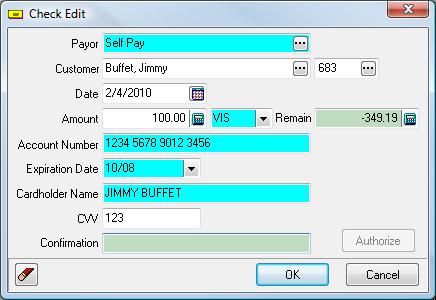
If you are setup to process credit cards, you can use credit cards to make payments on existing Claims/Invoices. When opening the payment list screen, you will see the check edit screen.
|
Step 1 |
On the screen select the payor (Normally SELF) and the customer. You can input the payment type and the card information, or you can swipe the credit card and this information (Payment Type, Account Number, Expiration Date, Cardholder Name) will be filled in automatically. Enter the CVV value from the back of the card. |
|
Step 2 |
Select and pay the Claims/Invoices as you would normally. You will notice the Remaining amount on the Check Edit form will decline as you enter payments. Once the Remaining is zero (0.00), the ‘Authorize’ button will become enabled. |
|
Step 3 |
Click Authorize to authorize the Credit Card payment. Note: If denied, you will see a message indicating the reason. If Once a payment has been authorized (i.e. has a confirmation number), you can not delete it. You must post any payment that has a confirmation number. |
Tell us what you think.
You must be logged in to post a comment.