• Tutorials
    • Forms, Navigation
    • Forms, Popup and Context Menus
    • Forms, Color of Fields
    • Forms, Changing the Font
    • Forms, Customizing
    • Forms, Printing Reports
    • Forms, Send Email
    • Forms, Help
    • Grids, Navigation
    • Grids, Scrollbars
    • Grids, Functions
    • Grids, Functions, Refresh
    • Grids, Functions, New Wizard
    • Grids, Incremental Search
    • Grids, Selecting Multiple Records
    • Grids, Find and Find Next
    • Grids, Filters
      • Filters, Creating a New
      • Filters, Getting Fancy
      • Filters, Saving and Reusing
      • Filters, Default Filters
    • Grids, Printing Reports
    • Grids, Customizing
    • Menus, Shortcut Keys
    • Forms, Form Letters
      • How to print a Form Letter, Richtext
      • How to print a Form Letter, PDF
      • How to create your own Form Letter
  • Webinars
  • Training
    • Windows XL Training
    • Mobile Delivery
  • What’s New
  • Follow us on Twitter

TeamDME! XL Help

  • System
    • Company
    • Postal Codes
    • Task
    • User Security
    • Dashboard
    • Report Designer
  • Inventory
    • Item
    • Item Category
    • Item Department
    • Item Manufacturer
    • Item Location
    • Tracked Item
    • Activity
      • Physical Count
      • Item Adjustment Edit
      • Service Transaction Edit
      • Item Transfer Edit
    • Reports
  • Orders
    • Diagnosis Code
    • HCPCS Procedure Code, Edit
    • HCPCS Procedure Modifier
    • HCPCS Coverage Criteria List
    • HCPCS Fee Schedule
    • Physician
    • Payor
    • Therapist
    • Facility
    • Quote
    • Medical Order
    • Point-of-Sale
    • Recurring
    • Claim Pending
    • Claim History
    • Reports
  • Receivable
    • Customer
    • Salesperson
    • Referral
    • Nonallowed Reason
    • Responsible Reason
    • Adjustment Reason
    • Payment Type
    • Payment
    • Reports
      • Aged Receivable Reports
      • Revenue Reports
      • Audit Reports
      • Finance Fee
      • Customer Statement
      • Collection Letter
  • Purchase Orders
    • Purchase Order
    • Purchase History
  • Payables
    • Vendor
    • Unposted Invoice
    • Unpaid Invoice
    • Reports
      • Aged Payable
      • Open Payable
      • Cash Requirements
      • IRS 1099 Forms
  • Ledger
    • Chart of Account
    • Journal Unposted
    • Journal History
    • Bank Register
    • Reports
      • Balance Sheet
      • Income Statement
      • Trial Balance
  • Windows
You are here: Home / Receivable / Table / Customer / Customer Edit, Print, Check Same-Or-Similar
«« Customer Edit, Print, Check EligibilityCustomer Edit, Wizard »»

Customer Edit, Print, Check Same-Or-Similar

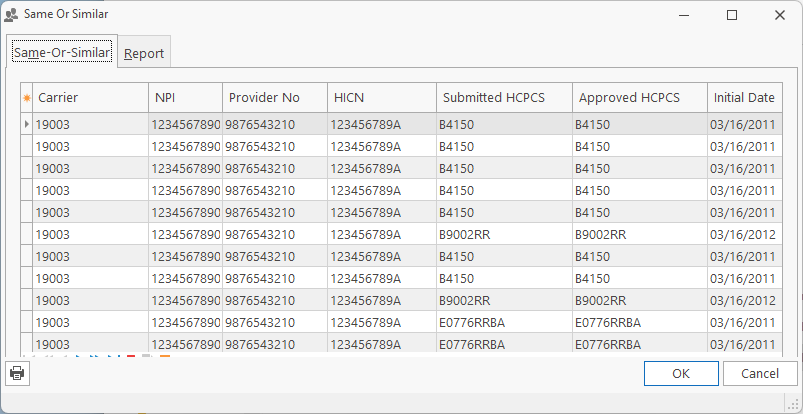
Allows you to check Same-Or-Similar from Medicare. The system will check all available Procedure codes (B,E,J,K,Q) available from the CMS system.

When the data is returned, it will display the HCPCS Procedure Code, Initial Date, Status, Length, Type and Total Rental Payment, Recertification/Revision Date, Supplier Name and Phone and Last Claim Date.

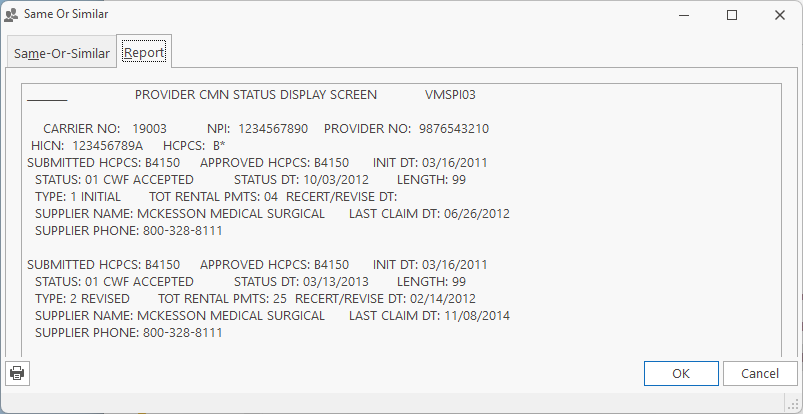
The Report tab is a text representation of the information returned from the SOS Inquiry, so if you want to see all the information, or you suspect that some field is not being represented on the form correctly, you can review the data directly.


Click here in order to sign up your Company to use the Same-Or-Similar feature.


If you do not have a CSI/VPIQ Username/Password, use the following links to request one.

DMAC A  https://med.noridianmedicare.com/web/jfa/forms
DMAC B  http://www.cgsmedicare.com/jb/forms/pdf/jb_csi_user_id_request_form.pdf
DMAC C  http://www.cgsmedicare.com/jc/forms/pdf/jc_csi_user_id_request_form.pdf
DMAC D Noridian Medicare Documents CSI Request


If you have a CSI/VPIQ Username/Password, but forgot the password, use these links to request a reset.

DMAC A – 866-563-0049
DMAC B – 877-273-4334
DMAC C – 866-270-4909
DMAC D – 877-320-0390
Trent Cable – 701-277-6779
Blair Thornton – 701-277-6806
David Ohmann – 701-277-6808
Tonya Cressman – 701-277-6691
Cindy Johnston – 701-277-6818
Alejandro Velasco – 701-277-6879

Page Tags: Customer, Similar
«« Customer Edit, Print, Check EligibilityCustomer Edit, Wizard »»

Tell us what you think. Cancel reply

You must be logged in to post a comment.

RETURN TO TOP

Copyright 2014-2026 · TeamDME!, Inc. · All Rights Reserved · Log in