• Tutorials
    • Forms, Navigation
    • Forms, Popup and Context Menus
    • Forms, Color of Fields
    • Forms, Changing the Font
    • Forms, Customizing
    • Forms, Printing Reports
    • Forms, Send Email
    • Forms, Help
    • Grids, Navigation
    • Grids, Scrollbars
    • Grids, Functions
    • Grids, Functions, Refresh
    • Grids, Functions, New Wizard
    • Grids, Incremental Search
    • Grids, Selecting Multiple Records
    • Grids, Find and Find Next
    • Grids, Filters
      • Filters, Creating a New
      • Filters, Getting Fancy
      • Filters, Saving and Reusing
      • Filters, Default Filters
    • Grids, Printing Reports
    • Grids, Customizing
    • Menus, Shortcut Keys
    • Forms, Form Letters
      • How to print a Form Letter, Richtext
      • How to print a Form Letter, PDF
      • How to create your own Form Letter
  • Webinars
  • Training
    • Windows XL Training
    • Mobile Delivery
  • What’s New
  • Follow us on Twitter

TeamDME! XL Help

  • System
    • Company
    • Postal Codes
    • Task
    • User Security
    • Dashboard
    • Report Designer
  • Inventory
    • Item
    • Item Category
    • Item Department
    • Item Manufacturer
    • Item Location
    • Tracked Item
    • Activity
      • Physical Count
      • Item Adjustment Edit
      • Service Transaction Edit
      • Item Transfer Edit
    • Reports
  • Orders
    • Diagnosis Code
    • HCPCS Procedure Code, Edit
    • HCPCS Procedure Modifier
    • HCPCS Coverage Criteria List
    • HCPCS Fee Schedule
    • Physician
    • Payor
    • Therapist
    • Facility
    • Quote
    • Medical Order
    • Point-of-Sale
    • Recurring
    • Claim Pending
    • Claim History
    • Reports
  • Receivable
    • Customer
    • Salesperson
    • Referral
    • Nonallowed Reason
    • Responsible Reason
    • Adjustment Reason
    • Payment Type
    • Payment
    • Reports
      • Aged Receivable Reports
      • Revenue Reports
      • Audit Reports
      • Finance Fee
      • Customer Statement
      • Collection Letter
  • Purchase Orders
    • Purchase Order
    • Purchase History
  • Payables
    • Vendor
    • Unposted Invoice
    • Unpaid Invoice
    • Reports
      • Aged Payable
      • Open Payable
      • Cash Requirements
      • IRS 1099 Forms
  • Ledger
    • Chart of Account
    • Journal Unposted
    • Journal History
    • Bank Register
    • Reports
      • Balance Sheet
      • Income Statement
      • Trial Balance
  • Windows
You are here: Home / Inventory / Table / Item / Item Edit, Package
«« Item Edit, ItemItem Edit, Location »»

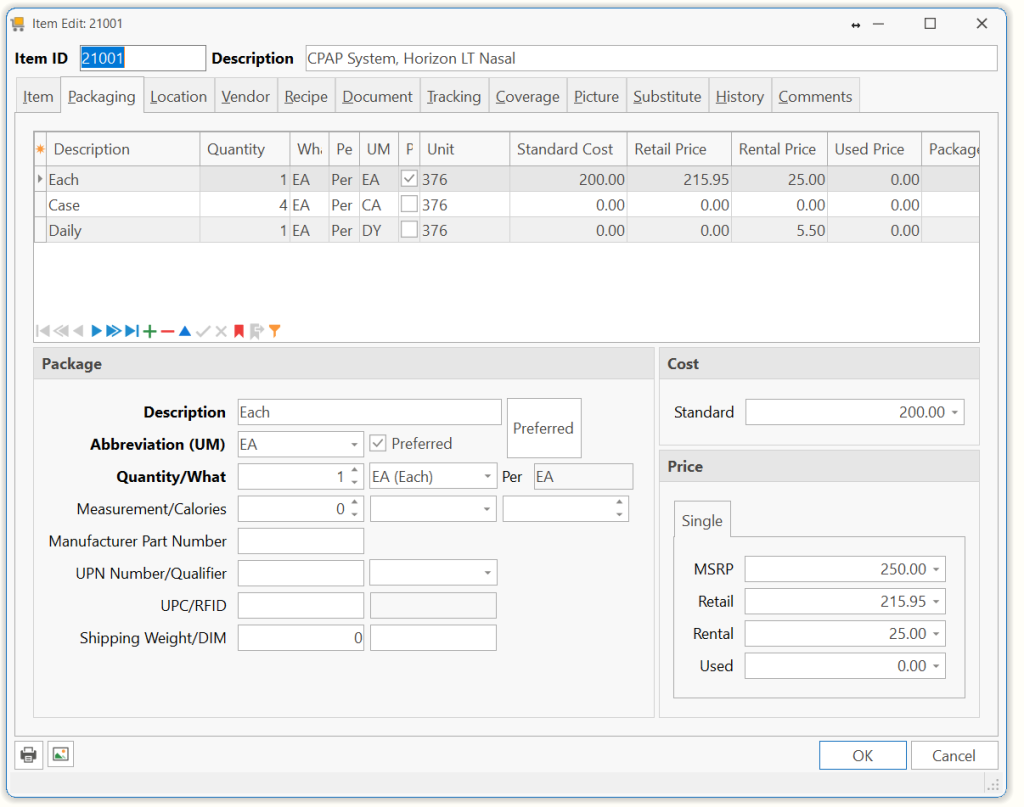
Item Edit, Package

The Packaging tab defines the various ways the Item is packaged, such as Each, Box, Case or Pallet.

Description Note: You must enter packages from the smallest unit to the largest (Each to Case). Each new package must be built from a UM already established (Box=4 Eaches, Case=12 Boxes)
Abbreviation (UM) An Abbreviation or Unit-of-Measure for the new package.
Quantity/What The Quantity of some other package is included in the new package, such as 12 EA per BX

The Of What is the other package included in the new package.
Example: EA=Each BX=Box CS=Case DZ=Dozen BG=Bag

Measurement/Calories Enter the size and calories of your item.

Example: 1 can of Ensure Plus. So, you would enter 240 Millimeters and 355 Calories

Manufacturer Part Number The Part Number assigned by the manufacturer to the package.
UPN Number/Qualifier Enter the Universal Pin Number that the payor has assigned to this item package.

Choose the correct Qualifier.

UPC/RFID The UPC assigned to the package by the manufacturer. This can be read under the UPC barcode as a series of numbers.

Note: This field can be populated by scanning the UPC from a package. This provides the ability to scan a UPC symbol at various points in the program and have the system automatically enter your Item ID.

Radio-Frequency Identification (RFID) is an automatic identification method, relying on storing and remotely retrieving data using devices called RFID tags or transponders.

Shipping Weight/DIM Shipping Weight of this package type.

Dimensions of this package type.

Standard Cost
MSRP The Standard cost is the accounting cost you assign to the Package. This is the cost used by the Ledger when the Package is sold/returned (Cost of Goods Sold).
Retail The price you normally sell the Package for, also referred to as the usual and customary charge.
Rental The price you normally rent the Package for.
Used The price you normally sell the Package if it were used.
Preferred Click this button to make the Package the default package when selling this Item.
Page Tags: Item, Package
«« Item Edit, ItemItem Edit, Location »»

Tell us what you think. Cancel reply

You must be logged in to post a comment.

RETURN TO TOP

Copyright 2014-2026 · TeamDME!, Inc. · All Rights Reserved · Log in
